January 2, 2010
no image

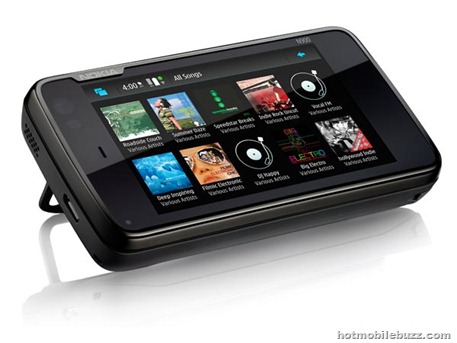
The Mozilla-based web browser on the Nokia N900 is out available on any smartphone. You can enable a mouse/cursor mode and enjoy free games on sites like PopCap Games. you can get Mozilla Firefox for your smartphones HERE
Check This Video of Nokia n900 Playing Zuma Online


n900 flash games, online games for nokia n900, nokia n900 games, n900 video preview
Read more
January 1, 2010
Resco Photo Viewer 5.03 For Symbian Mobiles

resco photo viewer
The Resco Photo Viewer for Symbian phones just got updated to 5.0.3 beta. The Resco Photo viewer application is by far the best photo / gallery application i have installed on my Symiban phones so download it and give it a try. Don’t forget that this is a beta release so there will be a few bugs.
Whats new in 5.0.3:
  • A few bug fixes in slideshow
  • Improved copy/move to dialog
  • Repeat rate while zooming with volume keys has been decreased (I hope it is ok now)
  • New crop option – Crop to screen
  • Setting to switch between single and double tap open
  • Extended beta period to 15.1.2010
Resco photo Viewer Download HERE

Resco Photo Viewer, Resco Photo Viewer download, free, free photo viewer for symbian mobiles, .sis files, resco photo viewer.sis, 5800, n97, n95, apps, beta,applications
Read more
LG Arena Variant Heading to AT&T Leaked Specs

lg arena showimage.php
LG handset is finally headed to the U.S. carrier. That means the device, the GT950, has a 3 inch display with resolution of 480 X 800 pixels, and feature LG's S-Class UI.  5MP camera, Wi-Fi, GPS, a 3.5mm audio jack and 8GB of memory under the hood. According to LG Central, no LG or AT&T reps that they contacted had any inkling that the GT950 was around. LG Central expects to see this launched sometime in the next few months.

arena, arena gt950, ArenaGt950, att, gt950, lg, lg arena, LgArena, rumor, rumors, s-class, leak, lg att
Read more
Synchronize BlackBerry with Mac

how to synchronize Blackberry with my Mac ?blackberry-for-mac 

Synchronize BlackBerry with my Desktop Computer HERE

Blackberry Synchronization With Your Mac might be Trouble Follow these easy steps to go through it.

  • Be sure you have PocketMac installed on your Mac already. If not you can get it for free here.(or just Google  it.)


  • Connect your BlackBerry to your Mac (PocketMac currently only supports USB and serial port).

  • Start PocketMac by clicking the icon.

  • Click on BlackBerry


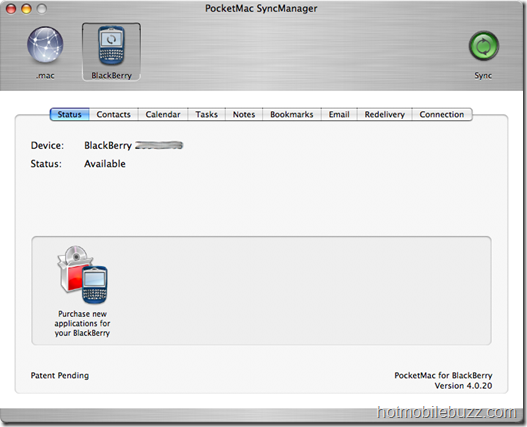
  • pocketmac_status

  • You should see your device name an PIN on that page. If not, make sure you connected your BlackBerry to your Mac already and restart PocketMac. Unlike the “BlackBerry Desktop Manager” for Windows PocketMac does not recognize devices that are attached during its runtime.


  • Click on the Contacts button to open the contacts tab


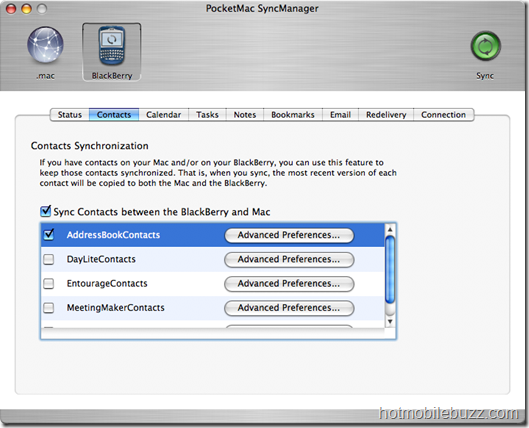
  • pocketmac_contacts

  • Activate the “Sync Contacts [...]“ checkbox to enable contact data synchronization in general. Below you find a list of supported contact management programs. As I am using Apple’s Address Book, I checked that one. You should check the appropriate checkbox according to the program you are using. You can also tweak the setting for the specific program you want to synchronize with at “Advanced Preferences…”. That’s it, we are done for contacts


  • Click on the Calendar button to open the calendar tab.


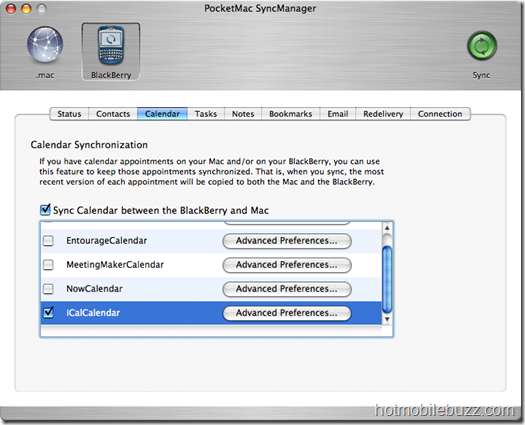
  • pocketmac_calendar

  • In here we also check the “Sync Calendar [...]“ checkbox to enable calendar item synchronization. As my configuration uses iCal for calendar items I selected “iCalCalendar”. That’s it, we are done for calendar items.


  • Click on the Tasks button to open the tasks tab


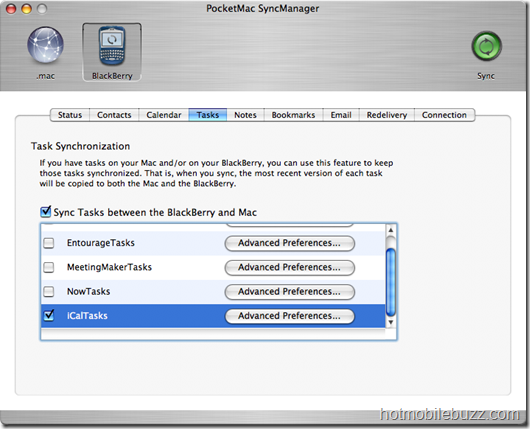
  • pocketmac_tasks

  • In here we also check the “Sync Tasks [...]“ checkbox to enable task synchronization. As my configuration uses iCal for task items as well I selected “iCalCalendar”. That’s it, we are done for tasks. (Hint: The program on the right – NextAction! – is compatible with PocketMac and therefor with all applications PocketMac can synchronize your BlackBerry with. It is world’s best GTD application for BlackBerry® Wireless Handhelds!)


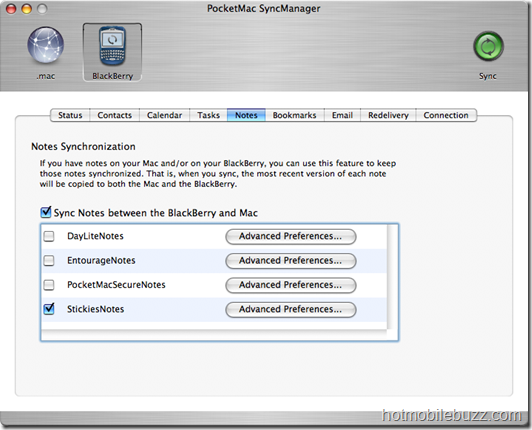
  • Click on the Notes button to open the notes tab


  • pocketmac_notes

  • In here we also check the “Sync Notes [...]“ checkbox to enable notes synchronization. As my configuration uses StickiesNotes for notes on my Mac I selected “StickiesNotes”. That’s it, we are done for notes.


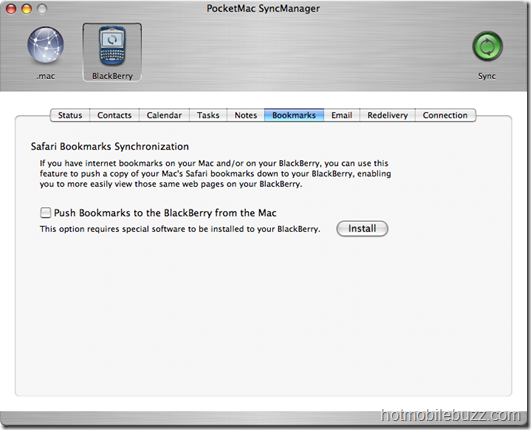
  • Click on the Bookmarks button to open the bookmarks tab


  • pocketmac_bookmarks     

  • As I am not using Safari for desktop browsing I don’t synchronize that. But those of you who like to use Safari can synchronize your Safari’s bookmarks to your BlackBerry. To do that, just activate the “Push Bookmarks [...]“ checkbox. That’s it, we are done for bookmarks.


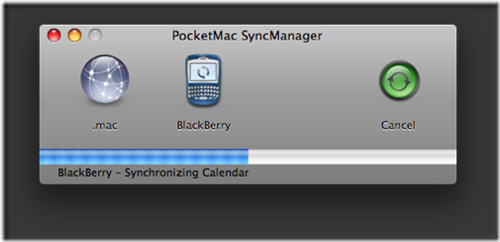
  • Now you can press the “Sync” button in the top right corner of PocketMac to synchronize your BlackBerry with your Mac and its programs


  • img12

  • Follow the instructions. If there are any conflicts between your device’s and desktop’s databases you will be notified

  • That's it all done.
  • Read more
    Download Mozilla Firefox For Nokia N900 Maemo

    nokia-n900_3
    Mozilla has released the first release candidate of Firefox for Maemo.   If you’ve already got beta 5 installed on your N900 or N810, you will be receiving a software update shortly.  Otherwise, if you’re viewing this on your device, you can install it from here.
    It Features improved text rendering, added new hooks for add-on developers, and continued to polish the application.Mozilla upholds the utmost security and privacy standards. Web site ID that checks on suspicious sites to ensure they're what they claim to be, as well as customizable security settings to manage passwords, cookies, loading images and installing add-ons give you complete control over your browsing experience.The Firefox mobile browser has many nice features, like the Awesome Bar, Password Manager, tabbed browsing, location-aware browsing, one-touch bookmarking, desktop syncing and add-ons
    Firefox is currently compatible with Nokia N810 and N900 mobile devices, as well as specific Windows Mobile 6.0 and above phones. Firefox is available for mobile devices on the Maemo platform in over 30 languages, with more platforms and languages on the way.

    Download Firefox for Maemo HERE

    Nokia n900 browser, download firefox for maemo, mozilla for mameo, fennic for maemo, rc1, mozilla firefox for n900 download, .install
    Read more