March 19, 2011
Google TV Remote App for iOS Available Download iTunes Link


google-tv-app

Google TV app was released for android last december and after four months it was developed to iOS devices. Remote App for Google TV has been launched for iPhone/ iPad. The app is now available for iPhones, iPads, and iPods running iOS 3 version or higher.

  • Your phone improves standard TV remote activities like changing channels or accessing your DVR. I love using it at night, because the back light means I can see all the buttons in the dark and the buttons are easy to find. Watch
  • You can also interact with your TV in ways you never have before. For instance, try using the voice search to find your favorite shows and movies just by speaking into your phone. There should be less fighting over the remote, too, since multiple phones can work as remotes at the same time—you just need to agree on what to watch!

Get the app from iTunes Store available free from the iTunes App Store

google tv, google tv app, iphone google tv, google tv app for iphone, ipad, ios3, remote app, google

Read more
January 26, 2011
LG Optimus One P500 Specs Review Price Features Android 2.2 Froyo USB Drivers Manual Download India

lg optimus one main
An Android-powered smartphone with 2.2 OS version, LG Optimus One offers smoother Internet browsing, Web-page loading, application pop-ups, multi-tasking and 40 pre-loaded applications. The phone is packed with 3 MP camera, 2 GB Memory, GPRS, EDGE, threaded messages and many more special features. It is now available at all retail outlets at Rs 13,500 approx(300$ USD). LG's Messaging widget, which displays your latest SMS messages in a simple little window on your Home screen. Contacts section slightly, adding a History tab that keeps track of your various interactions with each of the people in your phone's directory.
Three video resolutions are on offer – 640x480, 320x240 and 176x144 and format was 3GP. The Optimus One does a good job of picking up sound, however, with voices coming through loud and clear. The phone easily handles WMV files and DivX video files with good playback. Also the audio player is quite decent. There is mobile document handler as well surprisingly you can save files in docx format. The Battery backup is excellent with 1500 mAh battery under the hood. Talktime goess beyond 10 hrs while standby time is 2 days which really surprised us. At a budget price this smartphone really packs a punch with capacitive touchscreen rather than resistive, with Wifi tethering, Android 2.2 and good battery life. On the con side it still has a slow 600 mhz processor and lower 480x320 resolution. For Consumers at budget pricing LG Optimus One is bang  for a buck.
The major problem lies when you got to connect it to a PC. It doesn’t have enough drivers to seamlessly syn with a pc. Although there is a solution.
LG Optimus One P500 USB Drivers (for PC Suite)
Download the Setup HERE
Select P500 model number from the list
Install the Driver & Connect the USB cable to PC.
lg optimus one p500
LG Optimus Specs:
  • 3.2 inch TFT Capacitive display
  • 320 x 480 pixels resolution
  • 600 MHz processor
  • Android 2.2 (FroYo) OS
  • Wi-Fi
  • 3G Connectivity
  • Bluetooth 2.1 with A2DP
  • microUSB
  • A-GPS
  • 3.15 megapixel camera
  • microSD card slot
  • 170 MB internal memory
  • 32 GB expandable memory
  • 3.5 mm headphone jack
  • Up to 700 hours stand-by time
  • Up to 9 hours talktime
  • 1500 mAh battery
lg-optimus
LG Optimus one USER Manual Download
LG Optimus One Price in India: Rs. 9,900/- mrp, INR
Buy LG Optimus One HERE  apply coupn code RCOMLB1 get 10% OFF
Optimus One, lg p500 specs, lg Optimus One pros & cons, pros&cons, disadvantages, Optimus One review, preview, cost, price, indian market price, android phone lg, lg android mobiles, lg cheap android phones, low cost, download, lg p 500 user manual, usermanual, free, pc suite, usb drivers, install usb, how to, available, steps, specs, harga, lg touchscreen phones in india, software download, .pdf, apps, audio, jack
Read more
Five icons Columns iPhone App Cydia 2G/ 3GS/ 4 Source Download


IMG_0028


  • Launch Cydia. Select “sections” at haptic menu
  • Select Tweaks category and select Five-Column SpringBoard or Search  in Cydia and type Five-Column SpringBoard.
  • Select “install” button at the right top and confirm it to install. Once complete your iPhone will restart automatically.

adding fifth icon, add 5 columns. more icons, apple iphone five columns, free download, jailbreak,

Read more
January 22, 2011
Tata Docomo MNP Mobile Number Portability Process Charges Check Eligibility Offers

      docomomnp
           Want to check if your friends are using Tata Docomo Click HERE
         Confused ? Click HERE for Doubts & Help for Porting to Tata Docomo

TATA DOCOMO Porting Early Bird Offer PREPAID

  • Initial Talk time of Rs.10.
  • All Local On-net calls at 1p/6sec free for 3 months.
  • 99 Free local/National SMS free for the day after 1st SMS of the day charged at default rate**.
* Early Bird Offer applicable for all customers porting to Tata DOCOMO before 31st Jan'11.
** SMS offer applicable till SIM validity.
  • M.R.P. inclusive of Service Tax.
  • *Processing Fee in this offer has not been charged to the customer.
  • Special Talktime Offers applicable for all customers porting to Tata DOCOMO before 31st Jan '11.
  • Special Talktime Offers are applicable for 3 months post Port in.

Early Bird Offer  POSTPAID

  • On Net calls @1p/6sec i.e. 10p/min for the next 6 months.
  • 100 MB data/month for 6 months (Data can be consumed on 2G network)
  • Free Itemized Bill for 6 months

  • All the MNP plans will be available for the subscribers who are acquired under MNP and not for existing subscribers.
  • Early Bird offers will be available for all those customers who port in on or before 31st Mar’11.
  • On-Net calls means calls made to Tata DOCOMO, Tata Indicom Mobile and Virgin Mobile
  • The subscriber which are acquired under MNP scenario will be charged an entry cost of Rs.49 (SUK Charges : Rs.30 & Porting Charges : Rs.19). However there will be no activation charges for MNP plans till 31st Mar’11.
  • Existing GPRS, SMS & ISD packs are applicable on these plans.
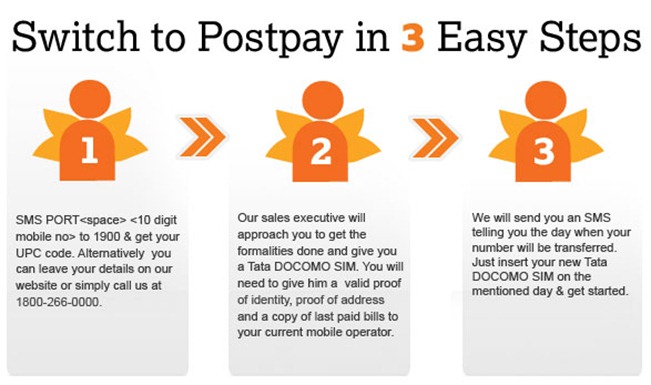
If you are a Postpay Customer you will need to follow simple instructions below or Call 1800-266-0000 and follow the guided process on the IVRS to switch to Tata DOCOMO.
Call 1800 266 0000 (Toll free).
mnp docomo, tata docomo mnp porting offers, mnp, mnp postpaid, prepaid, vouchers, tariffs, early bird offers, initial charges for mnp, mnp sim cost
Read more
TATA DOCOMO MNP FAQ Help Conditions UPC Code

  mnppostpay3
Got a question on MNP and how it works? You've come to the right place. Click on any of the categories below to see the most frequently asked questions. Can't find what you are looking for? Just Tweet your question on Mobile Number Portability to @tatadocomo on Twitter and we'll Tweet you right back
Q. I have a CDMA phone, can I port to a GSM operator?
A. Sure! But you will need a GSM compatible handset.
Q. Can I shift my landline number to a mobile number?
A. Shifting is allowed only between mobile numbers, shifting from a landline phone is not allowed.
Q. I have a prepay number with current operator, can I take a postpay connection through Mobile Number Portability?
A. Yes.
Q. Can I switch to Tata DOCOMO anywhere in India?
A. Well, for now you can switch only within your existing telecom circle. For e.g. If you have a Haryana number and want to shift to another circle, say Delhi with the same number, it’s not possible.
Q. Are there any conditions to join Tata DOCOMO?
A. Everyone is eligible to join Tata DOCOMO. But there are some things you have to take care of.  These are the rules of the Department of Telecom that apply to all operators, not just us.
  • You should have completed a period of 90 days (from the date of activation of your mobile connection) with your current operator.
  • You should have cleared all outstanding payments of your current Operator.
  • You should have no pending request for change of ownership of the mobile number.
  • Your mobile number sought to be ported should not be sub-judice i.e. under trial in a Court of Law.
  • Porting of your mobile number should not have been prohibited by a Court of Law.
  • There should be no ownership change request pending against the number you wish to port.
Q. I have paid my bills with my current operator till my last billing cycle, there is only the unbilled amount for current month for which my bill will only come in next billing cycle?
A. You will be required to make the pending payment once your previous service provider raises the bill to you, in case you do not pay the bill you will be liable for disconnection.
Q. Can my Mobile Number Portability request get rejected?
A. Yes, Your current service provider may reject the request if any of the eligibility criteria is not met.
Q. What documents are required for a mobile number portability request?
A. You need to submit:
  • Duly filled CAF form with UPC code details.
  • Copy of valid Address and Identity proof.
  • Copy of last bill paid to current service provider (in case of postpay customer).
Q. What steps do I need to follow if I want to switch to Tata DOCOMO?
A. If you are a prepay customer and want to switch to DOCOMO Prepay: Walk into any of our retail outlets with a photocopy of valid  proof of address and proof of identity and a passport size photograph. Fill the subscription form  with valid 8 digit UPC code. (The UPC code can be taken from your existing operator- Simply sms "PORT <space> <10 digit mobile number which you wish to port> to 1900.
If you want to switch to Tata DOCOMO Postpay:You can leave your details on our website or simply call us at 1800-266-0000. Our sales executive will approach you to get the formalities done. You will need to fill the subscription form and provide our sales representative with valid proof of address & proof of identity, a passport size photograph and copy of last paid bill to your current service provider.
Q. What is a UPC code?
A. Sounds complicated doesn’t it? Well it isn’t. UPC code is an 8 digit Unique porting code which you will be required to provide to Tata DOCOMO at the time of switching to us. You need go to the write message option on your mobile and type PORT followed by your ten digit mobile number. Send this message to 1900 from your mobile phone and you will get the code. That’s it!
Q. How fast will I get the UPC code?
A. Immediately after sending the SMS.
Q. When will my number get ported after applying?
A. Soon! After you have applied and your documents have been submitted, we will send your request to your existing operator for validations, post which an intimation will be sent to you on exact time and date of switching on your mobile number. The entire process will take maximum 7 days as per timelines set by regulatory.
Q. Will there be any disconnection of services in this process?
A. Your number will be functional throughout this process. The switchover will happen between 10 pm to 5 am to ensure your connectivity is not disrupted. However there will be a 2 hour span between 10 pm to 5 am when your services may be disrupted, this exact time would be communicated to you in advance.
Q. Do I need to cancel my account with my current service provider?
A. Nah, don’t worry about that. Your number will be automatically terminated by your current service provider and transferred to Tata DOCOMO as part of the mobile number portability request raised by you.
Q. Do I have to replace my SIM card?
A. Yes and why carry old baggage? Just replace your current SIM card with a new Tata DOCOMO SIM card and get talking.
Q. Do I need to pay any charges for switching to Tata DOCOMO?
A. Not a small fortune, just Rs.19 along with the application form & your documents.
Q. If my number is not successfully switched to Tata DOCOMO will Rs.19 be refundable?
A. Ooops, well the answer is no.
Q. Is there any penalty fee if I want to move out of Tata DOCOMO after getting switched?
A. We don’t believe in penalties. There will not be any penalty fee if you decide to move out, however you can only move out after completing 3 months with Tata DOCOMO.
Q. In case I have applied for Mobile Number Portability to Tata DOCOMO, but change my decision, what do I do?
A. We’ll be sad but you are the master of your will. All you need to do is submit a written application within 24 hours to Tata DOCOMO.
Q. Will I enjoy all existing services on your network as well?
A. Please specify that if you have ported to prepay services, you will get immediate access to Local/STD/ISD post activation. In case you have moved to postpay services Local & STD will be available immediately after activation, for ILD you will need to call our customer services desk. GPRS & Value added services will also need to be activated separately through a request to our customer services.
Q. Do I need to apply for DND (National Do Not Disturb) service after port in?
A. Yes, you can call at our contact center and give request for DND service activation. Also you may opt for the same while filling up the subscription form.
upc, unique porting code, 8 digit code, docomo porting help, tata docomo mnp help, how to switch to tata docomo, process, step by step, porting process, mnp process,  prepaid, postpaid,
Read more
January 18, 2011
Blackberry Storm 3 Leaked Specs & Features  Storm 9900 aka Montana


BlackBerry_Storm_3

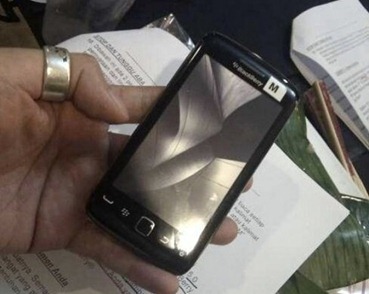
Blackberry Storm 3 has highest resolution of any BlackBerry with a 3.7-inch 800x480  display and also features an optical trackpad powered by a 1.2GHz CPU. Also Blackberry Torch 2 is being revised with a 1.2ghz processor replacing its 600mhz cpu presently by end of Q2. Blackberry Storm 3 Specs are leaked to early to have a sneak peak of the device. Also no carrier information or pricing had been confirmed. Blackberry Storm3 was previously known as Magnum and Dakota, is now called the BlackBerry Montana.

  • 1.2GHz processor
  • 3.7-inch 800 x 480 capacitive display
  • Quad-band GSM/GPRS/EDGE
  • Tri-band UMTS/HSPA
  • 5-megapixel camera with 720p video recording
  • 8GB eMMC (storage for apps and data), 512MB of RAM
  • microSD slot
  • Magnetometer
  • Proximity sensor
  • Accelerometer
  • Bluetooth 2.1 + EDR
  • 2.4GHz b/g/n and 5GHz a/n Wi-Fi + UMA
  • 3G Mobile hotspot
  • Optical trackpad
  • 1230 mAh battery
  • BlackBerry OS 6.1
  • OpenGL ES 2.0

Blackberry, Blackberry storm 3, Blackberry storm 9900, release, specifications, cost, details, info, qwerty, slider, <!--2da1d959dce547329eb5b0e0a8660fcd-->

Read more