Showing posts with label BlackBerry. Show all posts
January 18, 2011
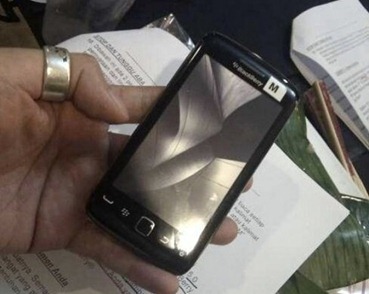
Blackberry Storm 3 Leaked Specs & Features  Storm 9900 aka Montana


BlackBerry_Storm_3

Blackberry Storm 3 has highest resolution of any BlackBerry with a 3.7-inch 800x480  display and also features an optical trackpad powered by a 1.2GHz CPU. Also Blackberry Torch 2 is being revised with a 1.2ghz processor replacing its 600mhz cpu presently by end of Q2. Blackberry Storm 3 Specs are leaked to early to have a sneak peak of the device. Also no carrier information or pricing had been confirmed. Blackberry Storm3 was previously known as Magnum and Dakota, is now called the BlackBerry Montana.

  • 1.2GHz processor
  • 3.7-inch 800 x 480 capacitive display
  • Quad-band GSM/GPRS/EDGE
  • Tri-band UMTS/HSPA
  • 5-megapixel camera with 720p video recording
  • 8GB eMMC (storage for apps and data), 512MB of RAM
  • microSD slot
  • Magnetometer
  • Proximity sensor
  • Accelerometer
  • Bluetooth 2.1 + EDR
  • 2.4GHz b/g/n and 5GHz a/n Wi-Fi + UMA
  • 3G Mobile hotspot
  • Optical trackpad
  • 1230 mAh battery
  • BlackBerry OS 6.1
  • OpenGL ES 2.0

Blackberry, Blackberry storm 3, Blackberry storm 9900, release, specifications, cost, details, info, qwerty, slider, <!--2da1d959dce547329eb5b0e0a8660fcd-->

Read more
December 7, 2010
Blackberry Torch 9800 Free Deals RadioShack Details & Features ATT

bb torch

Interested in Blackberry Torch Deals, then here is one for you. Radioshack is offering Blackberry Torch for Free with ATT contract. Also this promo has free FedEx Shipping and No additional Activation Costs. RIM’s latest addition to its business class smartphones Torch 9800 is available for 600$ Unlocked (without contract). Features include a 4.4-inches Display. Simpler, portrait QWERTY model. The Blackberry Torch 9800 has 512MB of RAM and 4GB of storage, with a microSD slot for additional storage up to 32GB.  Onbard 802.11b/g/n WiFi on board along with Bluetooth 2.1 support, as well as an AGPS chip for tracking powered by Blackberry OS6.

Get the Deal HERE

Blackberry Torch 9800 Review Specs HERE

Blackberry Torch Comparison HERE

Blackberry Torch in India HERE

Torch 9800, free, top deals, att, unlocked, rim, bb torch review, 9800 in india, blackberry torch 9800 price, cost, features

Read more
October 19, 2010
Blackberry 9800 Torch Price Rs.35k in india | Review

BlackBerry 9800 Review

Blackberry Torch Price in India :
* Price in indian rupees
Official price : 35000/- inr
Market Price : Rs. 33000/-


Blackberry Torch 9800 harga:
6,599,282.82 IDR (price in indonesia)

Blackberry Torch
9800 Specifications :

* Operating System: blackberry OS 6.0
* Form Factor : Slider
* 3.2 inches, TFT capacitive touchscreen; 16M colors
* Optical track-pad, Multi-touch input method
* Camera : 5 Mega Pixels with Auto-focus and LED flash
* Camera Resolution : 2592 x 1944 Pixels; 2x Digital Zoom.
* Video Player: Video Formats : .avi, MP4, WMV, H.263, H.264, DivX, XviD
* Video Resolution : VGA@24 fps
* Java enabled.
* Stand By Time : Up to 432 hours (2G) / Up to 336 Hr (3G)
* Talk Time : Up to 5 hours 30 minutes (2G) / Up to 5 Hr 40 min (3G)
* Battery Li-ion 1300 mAH
* Internal Memory : 4 GB storage. 512 MB RAM, 512 MB ROM
* External Memory Expandable Up to 32GB, 4GB card included
* Memory Slot : micro SD Card
* 3.5 mm Audio Jack
* 3G HSDPA; HSUPA
* GPS ready. with A-GPS support
* CPU 624 MHz processor
* Universal search

Box Pack Includes:
Handset, Charger, Battery, Earphone, Warranty Card, User Guide, USB Cable

Extra Camera Features :
Geo-tagging, continuous auto-focus, image stabilization
Special Features :
BlackBerry maps, Social feeds

Strength
*Sleek Design
*3G HSDPA
* BlackBerry OS 6.0; 624 MHz processor cpu
* Capacitive TouchScreen
* Full QWERTY keyboard, optical trackpad
* 5 MP camera, auto-focus, LED flash
* 512 MB RAM
* Wi-Fi
* GPS
* Radio
* 3.5 mm audio jack

Weakness:
* Too expensive
*Bulky around 161 grams
* No Adobe flash support

Verdict: A powerful smart-phone from RIM with great set of features and social networking facilities.

BlackberryTorch 9800 User Manual (PDF) Download HERE
Read more
October 8, 2010
Motorola Droid Pro vs Blackberry Torch 9800 Specs Comparison


droid pro vs blackberry

From the above comparison its clear almost in every aspect Droid Pro had edge over Blackberry Torch. 1GHz processor of Droid Pro obviously excels over 624 MHz processor that of blackberry Torch. As per concerns now a day flash is must for smooth browsing experience. Both have 5 Megapixel Cameras with flash. They also share WIFI, GPS, Bluetooth in common. Blackberry Torch 9800 has 3.2” inch Screen compared to 3.1 inch Screen of Droid Pro. Also Blackberry has 4Gb internal Memory whereas Droid Pro settles with 2GB. Droid Pro Comes with full Flash support where Blackberry Lacks. Moreover Droid Pro has 7 hrs talktime and 430 hrs Standbytime which is way better than blackberry. Its seems Blackberry got a tough competitor to fight. Droid series is now getting better. For sure there will be a some loss of Market Share to this “New Comer”.

 droid pro vs blackberry, droid pro advantages over blackberry, bb, droid pro compare with blackberry, droid pro vs blackberry specs, droid pro against blackberry, compare, vs., pros & cons, disadvantages, which is better, rim, google, NYSE:GOOG, NYSE:MOT, NYSE:VZ, specs,

Read more
September 24, 2010
Blackberry Torch 9800 Specs | Price | Details Features | Blackberry OS 6

torch

The BlackBerry Torch 9800 is available in stores.This is the first mobile phone by BlackBerry to feature their new BlackBerry 6.0 OS. This OS has been revamped integrating social networks & universal search at one place.

 BlackBerryTorch9800

The size and shape 4.4-inches up and down by 2.4-inches. Simpler, portrait QWERTY model. The Blackberry Torch 9800 has 512MB of RAM and 4GB of hardwired storage, with a microSD slot for additional storage up to 32GB.  Onbard 802.11b/g/n WiFi on board along with Bluetooth 2.1 support, as well as an AGPS chip for tracking. RIM's next play version of OS - BlackBerry 6. The universal search is probably the biggest and best new feautre in the new OS and allows you to find any contact, email, note, music or app simply by typing in the first few letters in the search box. The Blackberry 6 OS has powerful universal search along with a social networking tool which allows you to aggregate RSS feeds and services like Twitter or Facebook into a single view. You will be able to find just about any piece of content on the phone simply by beginning to type the name into the device. That goes for apps, music, contacts, notes, emails and everything. Torch offers lots and lots of ways to get somewhere which resembles Spotlight on a Mac. Blackberry Torch is now available in US by at&t.

blackberrytorch1

BlackBerry Torch Specs:

  • 5 Megapixel camera with auto focus, image stabilization and flash
  • 3.2 inch HVGA 480 x 360 screen
  • 512 MB on board memory with 4GB eMMC + 4GB media card
  • Slide-out QWERTY
  • 3.5mm Standard Audio Jack
  • Touch screen with on-screen keyboard: portrait SureType®, QWERTY and multi-tap, landscape QWERTY
  • Wi Fi – 802.11 b/g/n
  • 6 hrs Talktime, 30 hrs Music Playback
  • Standby time 18 Days
  • Blackberry OS 6.
  • Pinch & Zoom Functionality

Blackberry Software Update HERE

Blackberry Torch 9800 User Manual HERE

Official Webpage :http://na.blackberry.com/devices/blackberrytorch/

Get Blackberry Torch Here (AT&T) Best Buy -- HERE

Blackberry Torch 9800, Blackberry Torch 9800 specifications, review, price, us carriers, at&t contract torch, cost, Blackberry os6 details, handson, Blackberry Torch 9800 slider, qwerty blackberry, Blackberry Torch 9800 pros & cons, problems, Blackberry Torch 9800 full review, free download, download blackberry, touchscreen blackberry, UK price, indian price, Blackberry Torch 9800 indian price, market price, release, www.blackberry.com, rim, research in motion, 199, 199$ contract

Read more
May 10, 2010
Android overtakes Apple iPhone Os in Market Share | RIM Has the Crown

iphone-vs-nexusone
After the Q1 2010 results of smartphone OS share the results were as follows :
RIM – 36%
Android – 28%
Apple iphone Os – 21%
Yes Finally the Android overtakes iPhone Os in US market. Recent android smartphones made users stick to Android. Apple might be seeing this over. But both were way beyond RIM Market Share. Still Blackberry holds the No.1 Business Smartphone in US Market.

Here is the press release
Android Shakes Up U.S. Smartphone Market
Read more
March 20, 2010
Blackberry Push to Talk application Released by Verizon

push to talk verizon 

Verizon has released a Push-To-Talk application for BlackBerry smartphones. Verizon’s BlackBerry PTT app allows for unlimited nation-wide calls to other PTT devices. The charges are 5$/monthly per line. for enterprise lines it will be different though. You can freely download this application but needs to be activated by monthly fee. here are some quick features :

  • Make quick exchanges.
    Push one button to contact team members or clients.
  • Place group calls.
    Hold conversations with as many as 50 total participants.
  • Check team member status with Presence.
    See who is available for a Push to Talk call.
  • Manage contacts for the entire company online.
    Add, delete and assign contacts, create groups and more.
  • Use one number, one device.
    Make and receive voice calls without needing a second device or phone number.
  • Enjoy coast-to-coast coverage.
    Connect on our nationwide broadband network, and get expanded coverage across the United States within the National Enhanced Services Rate and Coverage Area.

Also Verizon has introduced referral system, if you refer any friend or other you will get $25 for a single line.

refer

Receive $25 for every line activated when you refer a qualified business and they activate Push To Talk service with Verizon Wireless.

Push-To-Talk app for blackberry, PTT app for blackberry, PTT app, PTT app download, verizon, verizon blackberry push to talk app, push to talk service fee, monthly8530, 9530, 9550, 9630, BlackBerry, Curve, RIM, Software, storm, Storm2, tour, Verizon, verizon wireless, VZW

Read more
Easy Steps to Update your Blackberry Software

image
Confused about how to update your Blackberry os? here is the complete solution you are looking for. The first and the best method to obtain a update is heading for the official blackberry site to get update. You could get the latest update HERE.
It is also possible to install an update from a different carrier (if they have the same BlackBerry model). This might be useful if your carrier does not provide the most recent version you need or you want to have a special foreign charset support. To install a OS update from a different carrier you have to delete C:\Program Files\Common Files\Research In Motion\AppLoader\VENDOR.XML first.
Download Blackberry AppLoader HERE
OR another way of updating your blackberry is through provider download Page you can find your providers below :
2
Asia Pacific
Europe
North America
South America
how to update blackberry os, blackberry os update process, blackberry software update, blackberry providers updates, blackberry os upgrade, step by step os update blackberry, can i download, blackberry carriers, updating blackberry os, rim software update, research in motion, steps for updating blackberry os, easy steps
Read more
March 18, 2010
Blackberry Push api’s Available for Developers | Features | Framework

Blackberry Push, Blackberry Push apps, Blackberry Push register, Blackberry Push software, rim bbpushapi_process

Last Year RIM announced that push APIs will be available to its Alliance Program members, finally  it looks like the rest of us are finally able to get that opportunity. From today onwards access comes in two packages: either BlackBerry Push Essentials or BlackBerry Push Plus with a number of tiers that reflect different options and price points.

The BlackBerry® Push Service is an essential component of the real-time, always-on experience of BlackBerry smartphones. It offers an incredibly efficient and reliable way of sending information to your users. It also allows your application to process information in the background and alert users.

Use the BlackBerry Push Service to incorporate the characteristics smartphone customers love into your applications, including improved battery life, applications that run in the background and the ability to get instant information.

Available to all developers

The BlackBerry Push Service is available to all developers and web content providers. By using push technology, you can make your app more engaging and help turn it into a Super App. Learn more about BlackBerry smartphone Super Apps.

BlackBerry Push Plus
  1. Content provider sends a push request.
  2. BlackBerry® Infrastructure returns a response.
  3. BlackBerry Infrastructure pushes the data to the BlackBerry smartphone.
  4. BlackBerry smartphone returns a response to the BlackBerry Infrastructure.
  5. BlackBerry Infrastructure forwards acknowledgement to content provider.
  6. Read notification is returned to the BlackBerry Infrastructure.

Technical Features of the BlackBerry Push Service

  • Allows up to 8 KB payload
  • Uses standard push protocols (WAP PAP 2.2)
  • Supports the following requests via HTTP XML:
    • Submit Push (to PIN)
    • Cancel Push
    • Query for Status
    • Query for Device Capabilities
  • Provides result notification responses
  • Provides different submission modes:
    • Point-to-point (submit push to single PIN)
    • Multicast (submit push to list of PINs)
    • Broadcast (submit to all PINs for a registered application)
  • Allows developers to control the expiry time (push system will automatically retry pushing requests until expiry time)
  • Supports delivery notifications
  • Provides a unique port per application, which helps avoid loss of user information
  • Allows applications to run in the background and process the push information, so users can be notified without a disruption in their current state (this feature is enabled by the multitasking and multiple process BlackBerry smartphone OS)
  • Allows developers to set the quality of service:
    • Application (“message reached application” acknowledgement returned to server)
    • Transport (“message reached port on device” acknowledgement)
    • Fire and Forget (no acknowledgements)

Register for Blackberry Push Service HERE

Blackberry Push Applications HERE

Read more
March 17, 2010
BlackBerry get Xobni Contact Management App | Free Download

xobniBlackBerry-Xobni-300x536Xobni’s much-vaunted Outlook plug-in is making the jump to mobile, starting with BlackBerry (NSDQ: RIMM). Xobni dynamically updates your address book by scanning incoming signatures and CC’s on e-mails. Not only are new contacts generated, but existing ones have their information updated automatically as needed. Like webOS Synergy, it pulls in extra contact information and ID pictures through LinkedIn and Facebook integration also.

xboni

Xobni imposes a ranking system to determine who you spend the most of your time talking to. That algorithm also works by second-degree, allowing you to see the relationships your contacts have with others. Although it overrides the bulk of the BlackBerry’s native address book, it plugs into the Calendar app so that you can shoot over your availability for meetings within a certain time frame with just a few clicks. There’s also some neat messages integration that pulls your Xobni address book with a quick upward flick. Within Xobni itself, you can see a full history with each of your respective contacts for quick reference.  You can also make one-click calls to multiple phone numbers through Xobni too. Xobni’s being packaged in a couple of ways: Xobni Mobile is a standalone app that’s $9.99 straight-up. Xobni One syncs up your contacts across Outlook and your BlackBerry, but that will be $6.99 plus a $3.99 monthly fee.An annual subscription, you can get both Mobile and One for $39.95 for the year. For those packing a BlackBerry Tour 9630, Curve 8900, Bold 9000 or 9700, and Storm or Storm2.

Download Xobni Free HERE

Xobni, Xobni free download, Xobni subscription, Xobni features, Xobni for blackberry, Xobni for mobiles, contact management software for mobile, best, Xobni fee, Xobni plans, Xobni for blackberry tour, contacts,

Read more
March 1, 2010
Blackberry BIS 3.0 Coming This March


bis-loginbox-400x345

BIS 3.0 is set to released on March 21st. While some will be happy and some will walk away unimpressed BIS 3.0 is coming at some point followed up by BIS 3.1 as well. Details about the two new BIS offerings have been anything less then short. As expected, the BIS 3.0 rollout was to come in early 2010 and March seems to fit that bill just right provided RIM keeps target.

RIM plans on keeping their rumored internal release date. There are great additions but OpenOffice support alongside WMA support coupled with Gmail 2 way synch for read/unread status isn't exactly on par with the likes of say the new webkit browser by any means.

 mediasync3_0

BlackBerry Email Administration Tool

BlackBerry Internet Service 3.0 includes the upgrade of the BlackBerry Email Administration Tool. New features include:

• Enhanced user interface providing clearer, easier access to information and functions within the tool

• The introduction of ‘Groups' for managing support staff who utilize the system

• Enhanced permissions capabilities for administrators to more easily define which features should be available to their support staff users

• Link to BlackBerry Technical Solutions Centre

• Expanded browser support

• Additional subscriber search options

Features

• Updates to the Enhanced Google MailTM plug-in for BlackBerry smartphones

• Increased attachment compatibility

⋅ OpenDocument presentations (.odp)

⋅ OpenDocument spreadsheets (.ods)

⋅ OpenDocument text (.odt)

⋅ OpenDocument text templates (.ott)

⋅ Windows Media® Audio (.wma)

• Improved email setup flow for HTML access

· xHTML Support for non-Thick Clients

• Device switch revalidation

• Carrier Friendly Names

• Hosted email address passwords

BIS 3.0, blackberry, BIS 3.0 update, BIS 3.0 features, BIS 3.0 release, BIS 3.0 download, BIS 3.0 blackberry, bis blackberry, rim bis, rim blackberry

Read more
February 8, 2010
How To install 3rd Party Applications on Your Blackberry

att-blackberry-apps

There are two ways of installing applications to your BlackBerry. You can download the software over the air (OTA) using the web browser on your device, or you can install an application from your PC using the RIM Desktop Manager.

OTAInstall1   OTAInstall2

To install OTA, you must have a URL for the software you want to install. The URL will point to a JAD file somewhere on the Internet. After entering the URL into the browser on your BlackBerry, it will prompt you to verify that you want to install the application. Say yes, and if all goes well it will install on your BlackBerry.

desktopManagerCutoff

The second method of installation uses the RIM Desktop Manager. Applications meant to be installed from the Desktop Manager come with two files: an ALX file and a COD file. First, connect your BlackBerry to your PC using a data cable. Once the device is attached, launch the RIM Desktop Manager. Then launch the Application Loader from inside the Desktop Manager.

Click the “Add…” button in the Application Loader and specify an Application Loader File(.alx). The application should now appear in the list of items to install. Follow the instructions from there to finish the installation and it should appear on your Blackberry. This is really hassle free installation. Enjoy!


Blackberry, Blackberry apps install, installing 3rd party applications for blackberry, apps install for blackberry, blackberry desktop manager, Blackberry ota install, java files for blackberry install, how to, step by step,  jad. ,jar, rim install

Read more
January 24, 2010
Remote Control your car using your Blackberry


Viper_BlackBerry_270x481

Using the application from Directed Electronics for BlackBerry, called the Viper SmartStart app users can give a rest to their car keys and enjoy the luxury of starting their cars with their BlackBerry phones. Not only will Viper SmartStart enable users to remotely start their cars, but it will also let them pop their trunks, activate the panic siren, lock the car and unlock it from a distance. Now that sounds quite exciting! Like the application’s version for the iPhone, it is expected that Viper SmartStart for the BlackBerry phones will allow users to exercise control over multiple vehicles and at the same time, tighten the degree of security so that if someone manages to grab your phone, he doesn’t get your car as a free gift with your BlackBerry smartphone.

The application will be available from BlackBerry App World and also most probably from the website of Viper. The application is free of cost, but the hard wares required may fetch you a bill of $300 to $500. If you already have a compatible Viper remote start system, then you need to get the VSM100 Viper SmartStart upgrade module or the DSM100 Directed SmartStart module, both of them costing $299 each. The Viper SmartStart System VSS400 works with the application well, but costs a hefty $400. Added to it is the probability that the application may call for an active subscription to the services of Viper SmartStart, costing $29.99 after a free first year subscription.

blackberry, blackberry app world, Viper SmartStart app, remote control, start your car, apps, remote

Read more
January 8, 2010
Blackberry Storm 2 Review | Specs | Price | Free Contract | Pros & Cons

 blackberry_storm2_9520_1  

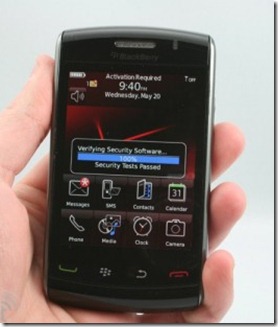
The Blackberry Storm  2 also has an amazing new display, totally new and changed from the old one. This one is not a big button but a new fancy technology called ”Piezo”. There will be two Storm 2; the Storm 9550 and the Storm 9520. The difference is that the Storm 9550 will be for Verizon with CDMA technology, and the Storm 2 9520 will be for ATT with GSM technology, finally, ATT users will be able to have a touchscreen Blackberry and enjoy 3G speeds at the same time. Another improvement is that both Storm 2 will have WI-FI, a huge advantage over the old Storm which one of the main complaints was the lack of this technology.

Key features:
* Quad-band GSM/GPRS/EDGE and 2100 MHz 3G with HSPA support
* 3.25" 65K-color capacitive touchscreen of 360 x 480 pixel resolution
* Improved touchscreen experience with piezo-electric touch feedback system
* 3.15 MP autofocus camera, LED flash
* BlackBerry OS 5
* Wi-Fi and built-in GPS with BlackBerry maps preloaded
* 2 GB internal storage and a hot-swappable microSD card slot
* Landscape on-screen keyboard is as close to hardware keys as we have seen on a touch phone
* Nice looks and great build quality
* 3.5mm standard audio jack
* Accelerometer sensor for screen auto-rotate
* Bluetooth v2.1 and USB v2.0
* Document editor
* Good audio quality
Main disadvantages:
* Mediocre camera
* No FM radio
* No web browser Flash support
* No dedicated video-call camera

vodafone blackberry

Buy Blackberry Storm 2 form Vodafone HERE

Blackberry Storm 2 without Contract Price : 569$ approx

Blackberry Storm 2 indian price: mrp 25900/- Rs approx


RIM have certainly succeeded in making their touchscreen absolutely consistent with the very BlackBerry concept. The Storm series are not shying away from innovation, but the number one purpose of innovation here is to respect tradition. There's nothing wrong with that but it's not the best way to appeal to a wider market. Anyway, the ongoing effort to match the hardware keyboard ergonomics on a touchscreen seems almost complete with the Storm2. Typing is what books the Storm2 a premier league place.
However yet again RIM seem to have underestimated the visuals and that might be decisive when the line is drawn. The outdated graphics have somewhat improved, with a bit of touchscreen makeup, but are no match for the elaborate and glamorous interfaces of the competition.
The Storm2 is in its prime at texting, but in all other contexts the device fails to impress. And even if you're willing to live with that, there comes the sky-high price tag to change your mind.

BlackBerry-Storm2-9520-pictures-3
Don't get us wrong - the idea of having a side-slider QWERTY functionality in a much more compact package is really appealing but not enough perhaps to justify that kind of asking price. After all, the competitors can give you an only slightly thicker QWERTY slider with a better screen and vastly superior multimedia for less.
Both Nokia N97 and Nokia N97 mini are credible alternatives for the Storm2 as they offer good enough typing and come easier on the wallet. The BlackBerry email and security are a class in their own but hardly always essential.
The Apple iPhone 3GS is perhaps both RIM's inspiration and frustration. Many observers were keen to interpret the Storm (and quite naturally the Storm2) as a direct response to the Apple phone. Yet we don't quite see how these will compare at all. One is all about near physical typing while the other is still choking with the haptics idea. But at the end of the day, if touchscreen is your only request, the general iPhone experience is way ahead of BlackBerry.

blackberry_storm_2_1-480x319
If the BlackBerry service limitations aren't much to your taste but you do insist on a touchscreen smartphone you have a great choice of powerful devices. Among the fairly recent releases, you might want to check out the Google Nexus One or plenty of WinMo handsets. Samsung Omnia II and OmniaPRO, HTC Touch Diamond2 and Touch Pro2 are all perfectly capable smartphones that will give you great all-round functionality without forcing you to spend extra on email.
Once again we have to underline that it's not a regular mobile phone we are talking about here. With BlackBerries, the service is an intrinsic part of the package and that makes it harder to make up your mind. You have to like them both or you better look elsewhere.
The straightforward assumption would be that the Storm2 is the dream device for those who have a solid BlackBerry background and want to explore touchscreen.


BlackBerry storm2 9250, storm 2, 9250 storm, BlackBerry, review, price, cost, storm 2 review, verizon wireless, launch, release, cost, price, features, storm 2 pros & cons, storm 2 disadvantages, storm 2 9550, buy, vodafone blackberry storm 2 free,

Read more
ÜberTwitter for Blackberry Now available for Download

Friends Timeline 

ÜberTwitter is a company devoted to delivering highly functional Twitter clients for mobile devices. Our first product is ÜberTwitter for the BlackBerry line of mobile phones. We are very excited about the opportunity to provide BlackBerry users with a full featured Twitter client which will include:

  • Integrated ability to upload pictures to a site dedicated to serving ÜberTwitter users
  • Ability to optionally update your Google Talk status with your last tweet, making your tweets reach a wider audience than just people following you on Twitter
  • Automatically update your location based on the cell tower information provided by your phone, no GPS hardware required, click here for an example
  • Send videos embedded in your tweet
  • See everyone who is tweeting near you


A new Beta version of UberTwitter has been released. It is already available to be used by you. This new version has incorporated a lot of great new features, so it surely guarantees a fabulous experience ahead.

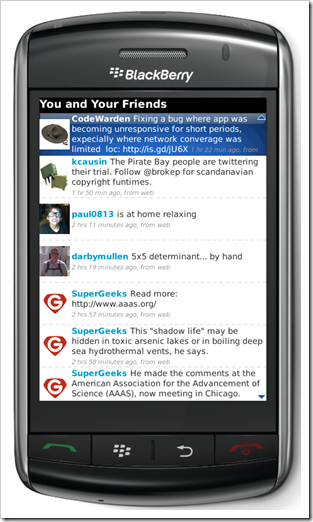
The new features that have been added to the UberTwitter Beta-6 allow users to do much more. They can use this application to create members, delete members, subscribe and add members, view members and much more. Using the ‘Find People’ link on the homepage of Twitter, users can also look for people. In the application, another new feature that has been added is called the Uber Bar. Further additions include the ability for users to use the old style RT in the Retweets function. It seems like much effort has been put in to ensure a great application for the BlackBerry loyalists.

If you wish you can use your handset to update your twitter profile directly using UberTwitter Beta-6. you can also report any spam, change the image of your profile directly from your BlackBerry device. With the help of Twitter Geo-Tagging, you have the choice of using yloc.me URLs, Twitter Geo-Tagging or use both of them. There are other exciting features that have been added to UberTwitter Beta-6.

UberTwitter Beta-6 certainly promises to enhance your experience of using the application in all possible ways. Using the application, you will be able to tweet even longer. You will be able to send longer tweets and even receive longer tweets. You can even choose to provide your own clarification. Confirmed users are notified using a small blue check-mark icon. The application also allows users to select between the old ‘bar’ layout and the new ‘bubble’ layout. So choose whichever you prefer and enjoy using this great application.

UberTwitter, UberTwitter for blackberry, UberTwitter beta 6, UberTwitter download, UberTwitter features, UberTwitter app, apps for blackberry

Read more
January 2, 2010
Blackberry Tour 2 with Trackpad and Better Processor by Q1 2010

blackberryThe BlackBerry Tour2 is supposed to have incorporated some changes when compared to its predecessor, the Tour. The most important change that can be seen in the Tour2 is the use of the trackpad. The old trackball which features in the Tour will not be seen in this version. It has been replaced by the optical trackpad which has found its way into almost all the new phones being released by Research In Motion. This replacement is expected to lessen the inconvenience faced by the users of the Tour due to the trackball. The Tour2 has also been endowed with a faster processor. The exact speed of the new one is not known as yet.

Apart from these two changes, the Tour2 is going to be pretty much the same as its predecessor, the BlackBerry Tour. The new Tour comes in a tablet shaped design. It also has an HVGA display having resolution 480 x 360. Other features that are going to be a part of this phone are a 3.2 mega pixel camera, a micro SD memory card slot, a QWERTY keyboard. The Tour2 also incorporates mobile broadband and a GPS receiver. Another addition to the BlackBerry Tour2 is the incorporation of Wi-Fi. It is expected to work in the same way that it does. Hence, ignoring the changes here and there, the Tour2 will almost be like a twin of its forerunner, the BlackBerry Tour.

At present, nothing much has been said about the launch of the phone by Research In Motion. The price of Tour2 is also not known, but it is being assumed that it will cost pretty much like the Tour around $200 and will be available by Q1 of 2010.

blackberry 9630, tour 2 specs, blackberry tour2 specs, features, cost, availability, blackberry tour2 release, optical track pad, trackball, rim, smartphone

Read more
Download Grooveshark for Android | Blackberry

groove Grooveshark

Grooveshark is a music streaming application that compares to Pandora. Grooveshark is not free if you wish to use on your BlackBerry, it requires a VIP pass that costs $3 per month. it is worth every penny in my opinion. The application does have features like radio stations based off of your favorite music, but is not totally centered around it. You can simply play any song you wish instantly, then search for your next song/album an "add/add all after current song" which really gives you the feeling of total control over your music. Grooveshark also features multiple custom playlists, favorites, and making songs accessible offline for those places where your service is not so good. Overall I think Grooveshark is a great app that sets itself apart from the rest with its song and album playing features. It is available for all BlackBerry's running OS 4.2.1 and requires a 3G/Wi-Fi connection to stream/cache music. As an added bonus Groveshark is available in Canada and (from what I can tell) most countries as well. You can download directly to your device from grooveshark.com.

Download GrooveShark For Blackberry HERE

Download GrooveShark For Android HERE

grooveshark for mobiles, android, blackberry, music application, apps, streaming music for blackberry, grooveshark monthly cost, tariff, plan details

Read more
January 1, 2010
Synchronize BlackBerry with Mac

how to synchronize Blackberry with my Mac ?blackberry-for-mac 

Synchronize BlackBerry with my Desktop Computer HERE

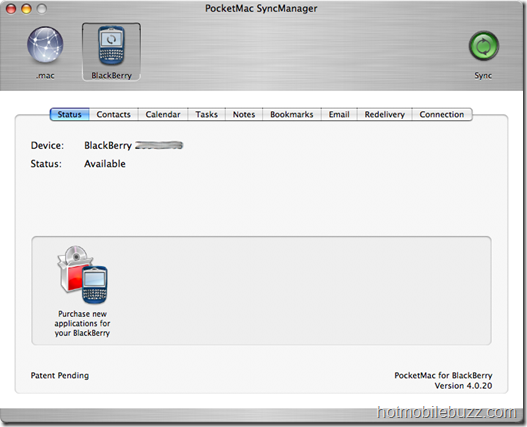
Blackberry Synchronization With Your Mac might be Trouble Follow these easy steps to go through it.

  • Be sure you have PocketMac installed on your Mac already. If not you can get it for free here.(or just Google  it.)


  • Connect your BlackBerry to your Mac (PocketMac currently only supports USB and serial port).

  • Start PocketMac by clicking the icon.

  • Click on BlackBerry


  • pocketmac_status

  • You should see your device name an PIN on that page. If not, make sure you connected your BlackBerry to your Mac already and restart PocketMac. Unlike the “BlackBerry Desktop Manager” for Windows PocketMac does not recognize devices that are attached during its runtime.


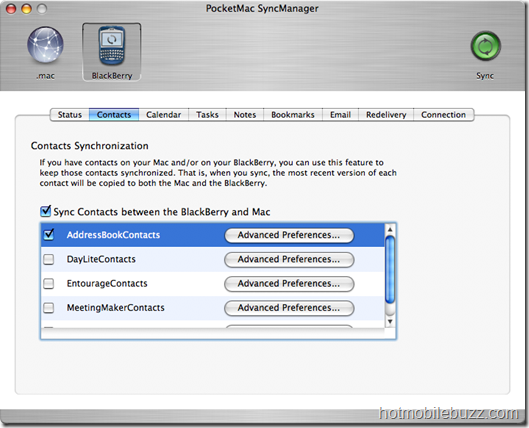
  • Click on the Contacts button to open the contacts tab


  • pocketmac_contacts

  • Activate the “Sync Contacts [...]“ checkbox to enable contact data synchronization in general. Below you find a list of supported contact management programs. As I am using Apple’s Address Book, I checked that one. You should check the appropriate checkbox according to the program you are using. You can also tweak the setting for the specific program you want to synchronize with at “Advanced Preferences…”. That’s it, we are done for contacts


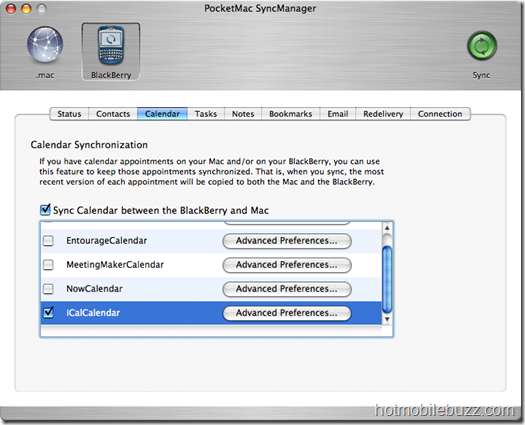
  • Click on the Calendar button to open the calendar tab.


  • pocketmac_calendar

  • In here we also check the “Sync Calendar [...]“ checkbox to enable calendar item synchronization. As my configuration uses iCal for calendar items I selected “iCalCalendar”. That’s it, we are done for calendar items.


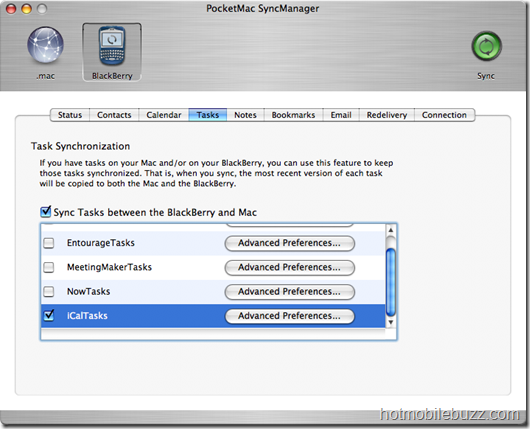
  • Click on the Tasks button to open the tasks tab


  • pocketmac_tasks

  • In here we also check the “Sync Tasks [...]“ checkbox to enable task synchronization. As my configuration uses iCal for task items as well I selected “iCalCalendar”. That’s it, we are done for tasks. (Hint: The program on the right – NextAction! – is compatible with PocketMac and therefor with all applications PocketMac can synchronize your BlackBerry with. It is world’s best GTD application for BlackBerry® Wireless Handhelds!)


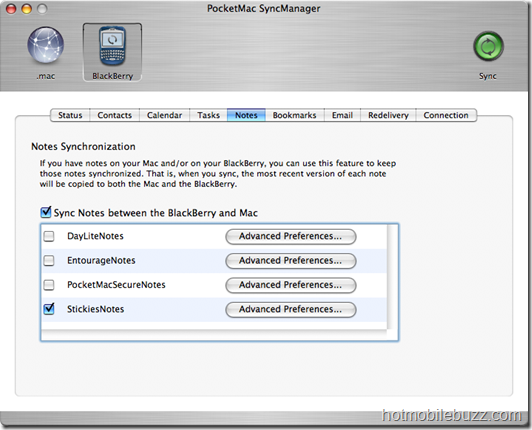
  • Click on the Notes button to open the notes tab


  • pocketmac_notes

  • In here we also check the “Sync Notes [...]“ checkbox to enable notes synchronization. As my configuration uses StickiesNotes for notes on my Mac I selected “StickiesNotes”. That’s it, we are done for notes.


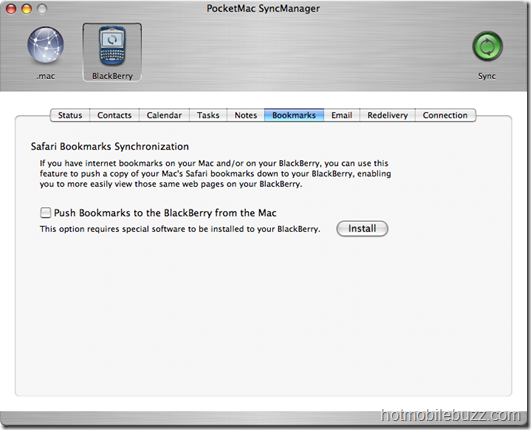
  • Click on the Bookmarks button to open the bookmarks tab


  • pocketmac_bookmarks     

  • As I am not using Safari for desktop browsing I don’t synchronize that. But those of you who like to use Safari can synchronize your Safari’s bookmarks to your BlackBerry. To do that, just activate the “Push Bookmarks [...]“ checkbox. That’s it, we are done for bookmarks.


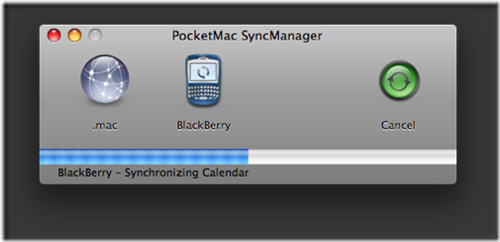
  • Now you can press the “Sync” button in the top right corner of PocketMac to synchronize your BlackBerry with your Mac and its programs


  • img12

  • Follow the instructions. If there are any conflicts between your device’s and desktop’s databases you will be notified

  • That's it all done.
  • Read more
    December 30, 2009
    Dell Offers Blackberry Bold 9700 For Free with AT&T

    bold free
    BlackBerry Bold 9700

    The BlackBerry Bold 9700 for AT&T is a premium smartphone with the productivity features you want, such as FREE access to more than 20,000 AT&T WiFi hotspots nationwide. With international 3G connectivity, the Bold 9700 lets you check Microsoft Exchange and personal email accounts, connect instantly to your favorite social networks, browse the web, download apps from BlackBerry App World and more at lighting fast speeds. The next-generation processor means improved multi-tasking. Record video clips with the 3.2 megapixel camera/ camcorder to share online easily, or meet up with friends using the global aGPS with AT&T Navigator support, and watch mobile videos together on the brilliant 2.4” color screen with speakerphone or stereo Bluetooth headphones. With productivity and entertainment pre-loaded, the BlackBerry Bold 9700 is a smartphone that is the perfect blend of style and cutting-edge technology.
    Highlights
    • FREE Acccess To More Than 20,000 AT&T WiFi Hotspots Nationwide
    • 3.2 Megapixel Camera/ Camcorder To Record Memories and Easily Share Them
    • Download Apps From The BlackBerry App World To Customize Your Phone
    • Connect Worldwide With International-capable 3G Or WiFi
    • Find Your Way With Integrated Global GPS and Support For AT&T Navigator
    • View and Edit Microsoft Word, Excel and PowerPoint Documents Attached To Email
    • New BlackBerry OS 5.0 Features Updates To Messaging, Calendar and Browser Capabilities
    • 3G device - GSM/GPRS/EDGE/UMTS (Bands: 850, 900, 1800, 1900)
    • 480 by 360 display, beveled edges
    • 256 megabytes of internal memory (same as Curve 8900, 8520)
    • 1550mAh M-S1 battery (same as Bold)
    • 3.2 megapixel camera, with flash and auto focus
    • GPS, WiFi (UMA capable but we'll see what happens there), and all the normal stuff you'd expect on a BlackBerry smartphone
    Buy Blackberry Bold HERE

    BlackBerry Bold 9700 free, at t, at&t, BlackBerry Bold 9700 free dell, BlackBerry Bold 9700 with at&t contract, discount, BlackBerry Bold 9700 specs, features
    Read more
    December 28, 2009
    Blackberry Pearl Flip 8230 Now For 9.99 $

    balckberry pearl
    Verizon is now Offers Blackberry Pearl Flip 8230 for 9.99$ with 2yr Contract. Open up a world of possibilities with one quick flip! The NEW BlackBerry® Pearl™ Flip 8230 smartphone from Verizon Wireless keeps you connected to your friends and family with Text, Picture, Video and Instant Messaging,and delivers on–the–go entertainment with access to the internet and streaming media. With a discreet preview screen, it also puts you in control of how, when and where you communicate.
    Blackberry Pearl Flip 8230 Quick Specs

  • 2.0 Megapixel Camera

  • microSD™ Flash Memory Expansion Slot

  • Bluetooth® Capable*

  • Clamshell design (first flip phone from RIM)

  • Sure Type QWERTY keyboard

  • Visual Voice Mail compatible

  • Trackball Navigation

  • TTY Compatible

  • Hearing Aid Compatibility = M4/T4
    For details on Hearing Aid Compatibility, see About Us — Accessibility.

  • Meets FCC SAR limit. Manufacturer's highest FCC reported SAR: Head – 1.23 W/kg, Body: 0.95 W/kg. Actual SAR may vary.


  • Buy Blackberry Pearl Flip 8230 HERE

    Blackberry Pearl Flip 8230, Blackberry Pearl Flip 8230 specs, specifications, Blackberry Pearl Flip 8230 verizon contract, Blackberry Pearl Flip 8230 discount,
    Read more